Dellova: A Handwritten Font That Brings Warmth to Web Design
Testing Dellova in a Real Web Project: A Portfolio Redesign
I recently took on a redesign project for a local artist’s portfolio website. The goal was to create a digital space that felt personal, inviting, and true to the artist’s creative voice. I had heard about Dellova through a design community and decided to test it in the hero section. Right away, the font stood out for its natural, handwritten charm. It wasn’t overly stylized like many script fonts, which made it feel both modern and approachable. I placed it over a soft background image of brush strokes and paired it with a clean sans serif for the body text. The result was a homepage that felt alive and uniquely human.
Visual Personality and Digital Appeal
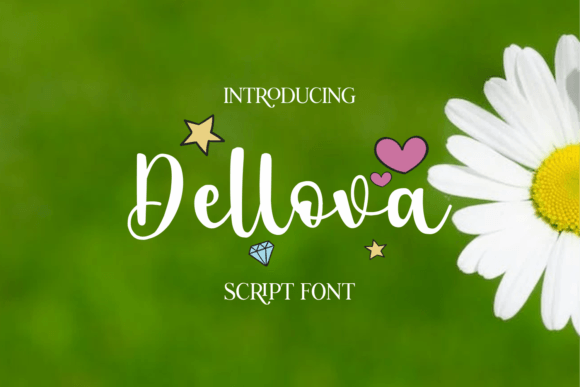
Dellova has a soft, flowing structure that mimics real handwriting without the messiness. Its gentle curves and subtle variation in stroke weight give it character while maintaining legibility. It falls into the category of a handwritten script font—perfect for adding a personal touch to digital interfaces. Unlike many decorative fonts that lose clarity on screens, Dellova holds up well across devices. I tested it at different font sizes and found it readable even on smaller headings, though I wouldn’t recommend it for long paragraphs or fine print.
What really stood out was how it softened the overall tone of the layout. For a coaching website or creative portfolio, this kind of warmth can help build an emotional connection with visitors. It’s also a great fit for boutique brands or lifestyle blogs that want to stand out with a unique typeface that still feels professional.
Real-World Web Applications
I used Dellova in several areas of the site, including the hero headline, project titles, and callout sections. It worked beautifully in the main hero section, where the artist’s name appeared in large, flowing letters. On mobile, the font scaled gracefully—no distortion or pixelation. I also tried it in a promotional banner for a digital course landing page, and it added a sense of authenticity that stocky sans serifs couldn’t match.
Here are a few other effective uses I found:
- Logo text for a wellness blog
- Featured quote sections on a storytelling website
- Call-to-action buttons on a product landing page
- Section headers in a digital brand kit
- Testimonial highlights on a coaching website
Readability and Responsive Design
From a UX design perspective, readability is crucial. While Dellova isn’t suited for body copy, it shines as a display font in headlines and accents. I tested it on both light and dark backgrounds and found it most effective with a slight contrast boost—especially on mobile where glare can affect legibility. When used over images, I added a subtle background overlay to ensure the text popped without losing its organic feel.
One thing to note: avoid using it for very small text elements like form labels or navigation links. The font’s decorative nature can make it harder to read at sizes below 16px, especially for users with visual impairments. Always check for accessibility compliance when using decorative web fonts like this.
Font Pairing for Web Design
Pairing Dellova with a clean, modern sans serif like Open Sans or Lato helped balance the layout. For a more editorial feel, I also tried it with a serif font like Merriweather, which gave the design a timeless quality. The key is to let Dellova be the star of the show while supporting it with simpler, more structured fonts.
For logo use, I combined it with a bold sans serif for the tagline, creating a strong visual hierarchy. This approach works especially well for brands that want to feel both creative and trustworthy.
Technical Considerations and Licensing
When working with any commercial font, it’s important to verify the licensing terms. Dellova includes multiple weights and supports a wide range of characters, including multilingual glyphs—making it suitable for international websites. I downloaded the web-optimized formats (WOFF, TTF) and integrated them smoothly into the site’s CSS. Load times were minimal, and the font rendered consistently across browsers.
Before using Dellova in a client project, I recommend checking the font’s documentation for:
- Available styles and alternates
- Webfont compatibility
- Commercial use permissions
- Multilingual support
Final Thoughts: A Versatile Typeface for Digital Brands
Dellova is more than just a pretty font—it’s a tool for crafting digital experiences that feel personal and intentional. Whether you’re designing a landing page, portfolio, or online brand identity, this script font brings a unique blend of warmth and professionalism. It’s not a one-size-fits-all solution, but when used thoughtfully, it can elevate the emotional tone of your web design.
If you’re looking to add a touch of handmade charm to your next digital project, give Dellova a try. It might just be the missing piece that brings your brand’s personality to life online.